Make it, break it, make it work for you, and then share it
UART Cables

For our course, we are using a UART (wired) connection for the initial configuration of the Wink Hub. The issues associated with a wired connection are quicker, easier and cheaper to overcome than those of a wireless connection in a classroom setting. The fact that the Wink Hub will need to be opened and a connection needs to be soldered is trivial considering that the course is being taught in a makerspace. If not attending a course, consider the implications and difficulties of each strategy before choosing one. Don't let the issues we discuss scare you away from taking control of your Wink Hub. The advantages of taking control clearly outweigh a few minutes of trying something new.
Wireless configuration causes several issues in a classroom setting:
- A dozen or so pseudo-random SSIDs and the process of figuring out which SSID belongs to which Wink Hub,
- Installation and use of software that the typical user will never want or need to use again,
- The purchase, installation and configuration of hardware which is more expensive than a cable, which may only require a few minutes of scrounging for many people
The latter two considerations still exist even when you're not in a classroom setting.
Do not connect Vcc on the Wink Hub's UART port to the Raspberry Pi.
- It is not functionally required - Only Ground, Tx and Rx are required
- The Wink Hub will pull too much current from the Raspberry Pi, damaging the Raspberry Pi
- Unintentionally reversing Vcc and Ground will severely damage both the Wink Hub and Raspberry Pi
- Using the 5v connection from the Raspberry Pi will severely damage the Wink Hub
The simplest cable can be the momentary retasking of the audio cable between a CD/DVD drive and the motherboard from a desktop computer. This requires the Wink Hub to be reopened if this connection is ever needed again. CD audio cables will need to be re-pinned, but this is a simple process with a sewing needle or a safety pin.
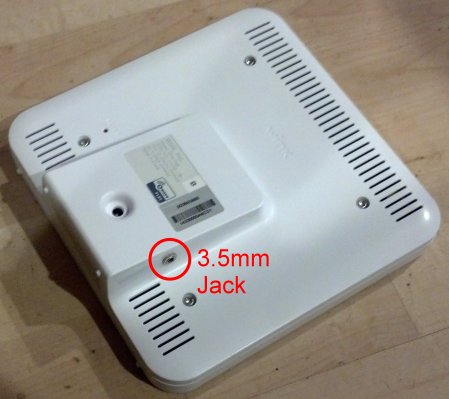
Our preferred cable is actually two cables, but it creates a safe connection to the UART on the Wink Hub without having to reopen the Wink Hub in the future. It uses a 3.5mm three-conductor (headphone) jack mounted neatly on the back of the Wink Hub.
- Raspberry Pi B
- Raspberry Pi B+
-
Simple cable, no external connection
-
Preferred cable, with external connection
-
- Raspberry Pi 2
-
Simple cable, no external connection
-
Preferred cable, with external connection
-
We discovered in our first class that the Raspberry Pi B+ and Raspberry Pi 2 have a 40-pin UART connection rather than 26-pins. Cable drawings will be attached soon.
Note that the data lines are crossed over, where Rx on one end is connected to Tx on the other.
We are looking for an inexpensive manufactured cable that will be a good choice, and will post links if we find any.
Soldering and positioning of external jack: Work in progress...